
Overview of e-invoice
e-Invoice, or electronic invoice, is a digital version of a traditional paper invoice that allows businesses to issue, receive, and store invoices electronically in a structured format. Implemented by LHDN (Inland Revenue Board of Malaysia), the e-Invoice system aims to enhance tax transparency, reduce fraud, and simplify compliance through real-time data submission and verification.
By adopting e-Invoice, businesses can streamline billing processes, minimize errors, and improve efficiency — ensuring smoother operations and easier compliance with Malaysia’s evolving tax landscape.
An e-Invoice is a digital representation of a transaction between a supplier and a buyer. e-Invoice replaces paper or electronic documents such as invoices, credit notes, and debit notes.
An e-Invoice contains the same essential information as traditional document, for example, supplier’s and buyer’s details, item description, quantity, price excluding tax, tax, and total amount, which records transaction data for daily business operations.
To support a smooth transition to e-Invoicing, taxpayers can choose the transmission method that best aligns with their business needs and operational setup.
There are two available mechanisms for submitting e-Invoices to the Inland Revenue Board of Malaysia (IRBM):
1. MyInvois Portal
A web-based platform provided and hosted by IRBM.
Free and accessible to all taxpayers.
Designed for businesses without an existing system integration or API connection.
Enables taxpayers to manually issue and manage e-Invoices easily.
2. Application Programming Interface (API)
A set of programming codes that allows direct, automated data exchange between a taxpayer’s internal system and the MyInvois system.
Requires initial investment in technology and system adjustments.
Best suited for large organizations or businesses managing high transaction volumes.
The diagram below illustrates the overall e-Invoice workflow — from the point of sale or transaction, where an e-Invoice is generated through either the MyInvois Portal or API, to its validation and secure storage within IRBM’s database, where taxpayers can later access their historical e-Invoices.
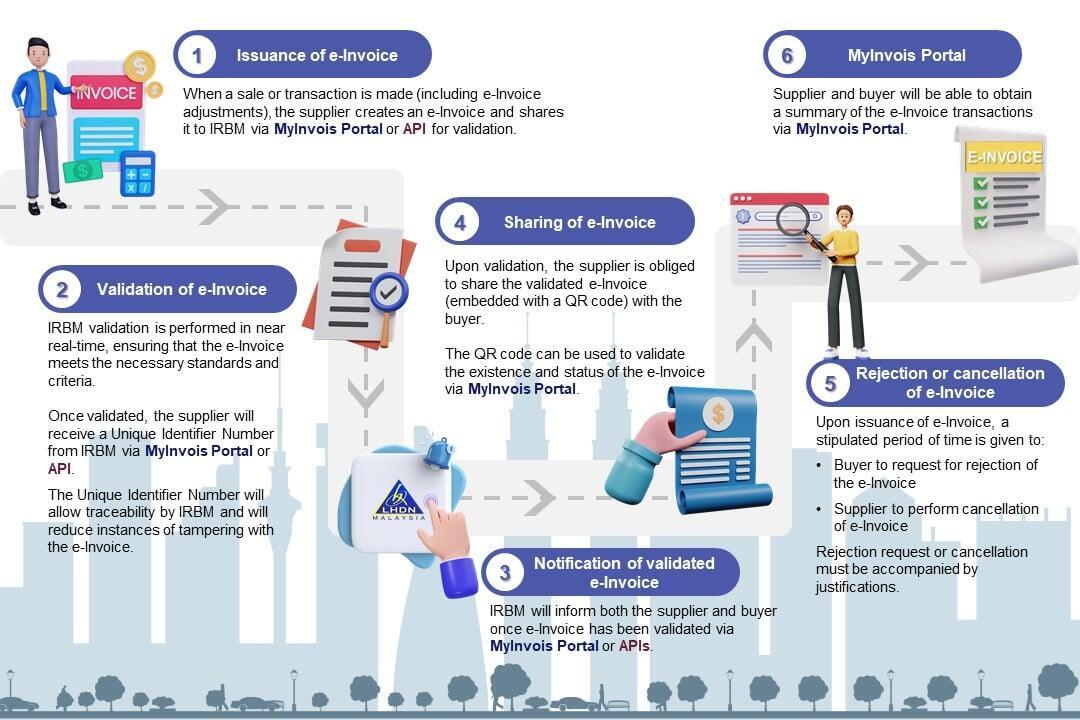
e-Invoice will be implemented in phases to ensure smooth transition. The roll-out of e-Invoice has been planned with careful consideration, taking into account the turnover or revenue thresholds, to provide taxpayers with sufficient time to prepare and adapt to the e-Invoice implementation.
Below is the e-Invoice implementation timeline:
| Targeted Taxpayers | Implementation Date |
|---|---|
| Taxpayers with an annual turnover or revenue of more than RM100 million | 1 August 2024 |
| Taxpayers with an annual turnover or revenue of more than RM25 million and up to RM100 million | 1 January 2025 |
| Taxpayers with an annual turnover or revenue of more than RM5 million and up to RM25 million | 1 July 2025 |
| Taxpayers with an annual turnover or revenue of more than RM1 million and up to RM5 million | 1 January 2026 |
| Taxpayers with an annual turnover or revenue of up to RM1 million | 1 July 2026 |
**Note: e-Invoice implementation timeline been updated on 5 June 2025
The MyInvois Portal is an e-invoicing solution provided by IRBM at no charge. This platform is designed to facilitate the implementation of e-Invoice for all taxpayers especially for those who are not using the business ERP system to issue e-Invois. Accessible via computers, laptops, and smartphones, the portal enables users to manage e-Invoice efficiently from anywhere, at any time.
MyInvois Portal provides key features as follows:
- Profile Management for User, Taxpayers, Representative, ERP System and Intermediary; and
- Document Management includes Submit, View, Reject, Cancel and Print Document.
Taxpayers can access the MyInvois Portal via the MyTax Portal, the gateway of HASiL e-Services. To facilitate the use of the MyInvois Portal, HASiL provides two (2) environments that can be accessed by taxpayers as follows:
[Note: Taxpayers must ensure to use the correct environment for e-Invoice submission to HASiL]
| User Environment | Description | Link | User Manual |
|---|---|---|---|
| Testing (Sandbox) | Allow taxpayers to try the functions provided in the portal before using the actual (production) environment. Information sent to the testing environment will not be stored in the HASiL database and will not be migrated to the production environment. | https://preprod-mytax.hasil.gov.my | First time login user guide to MyTax Portal (Testing Environment) – Company Director and Company Representative Visit https://preprod-mytax.hasil.gov.my and click User Manual:
[Note: The Company Representative must complete the first time login to the MyTax Portal (Testing Environment) before can be appointed as a 'Company Representative' by the Director] MyInvois Portal user guide Visit https://preprod-mytax.hasil.gov.my and click MyInvois Portal User Guide |
| Production (Actual) | Enables taxpayers to submit e-Invoices with real information and use other related functions | https://mytax.hasil.gov.my | First time login user guide to MyTax Portal Visit https://mytax.hasil.gov.my and click User Manual
MyInvois Portal user guide Visit https://mytax.hasil.gov.my and click MyInvois Portal User Guide |